


Saturday, March 2, 2013 @ 1:39 AM 0 stares
So yeah,HERE! I'm back. Just want to give you all a tutz officially by me. Oh well,who miss me? Oh nobody? Kay fine..
Now I will tell you how you can use twitter archive. Just to let you know, twitter achive is a twitter service from a given to 'remind' us of our own past tweets. And I've tried! Exciting and make me laugh. This service I recommend to all of you, my blog readers. I hope this tutorial helped you!
First step you must do is HAVING A TWITTER! If you don't have a twitter,you can sign up for FREE. Done sign up? Okay,good.
Open the Setting Option on your twitter. And then,scroll your scrollbar till you see "Your Twitter Archive" right there.

Just click the "Request your Archive" button there. And Twitter will sent you an email! Open your email and click "Go Now" or click the link below "Go Now" button.

And you will connected to this link!

Click 'Download' and the file will be downloaded! Your file will be downloaded as .zip,and you must unzip it and open 'index.html' to view your information.
Twala! You can read your old tweets,just click the years that you want and then..boom! The tweets are ready to read. Um..i think that's all that I can say to all of you guys.
Hope this tutz helped! x
Monday, December 31, 2012 @ 8:02 PM 0 stares
Now I really like photo editing! And I post to Instagram. Thank God, there is a good response, and since then, I transmissivity photo editing, hahaha ..
I used to edit in many application! And it turns out it's not as easy to edit as I think, must have a high IMAGINATION and of course, already an expert in the work especial edited photo, the bottom line, I'm still new to photo editing, hmm ..
Want to know what my edits? Here it is ..

I edited it with GIMP for Computer and Photoscape! :D

I edited it with Pic Collage,Blendcam and Phonto! :D

I edited it with Pic Collage,Blendcam and Phonto! :D

I edited it with Pic Collage and Phonto! :D

I edited it with Pic Collage and Blendcam. Bad,yeah I know..

I edited it with Pic Collage,Blendcam and Phonto!

Edited it with Pic Collage,Blendcam and Phonto
AAAND many more! Too lazy to post it to Blog hehehe.. Just click this link and you will entered to my Instagram. Yihiii! Happy editing. By the way,I'm iPod user so..Pic Collage,Blendcam or Phonto is not available for PC.
Kay that's all,enjoooooy! OHYEAH and HAPPY NEW YEAARR!!!! <3
Saturday, December 8, 2012 @ 7:27 PM 0 stares
The plan helicopter was used to fly cruise from London layover in Dublin, Paris, Barcelona, Rome, Frankfurt, Copenhagen, and then back to London which takes 14-16 days.
Want to see the photo of flying hotel? Check it out and getting ready to be amazed!
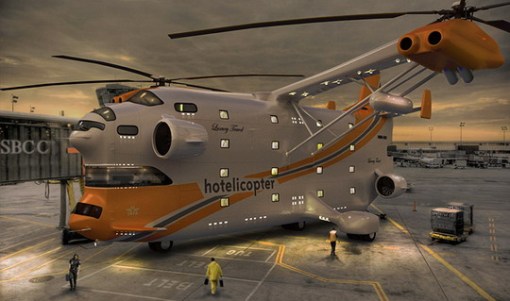
Apparently the name of the flying hotel is Hotelicopter!
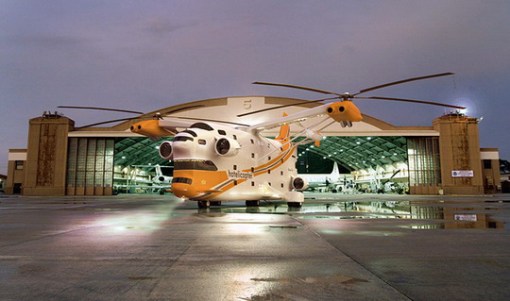

Wow,cool! :0
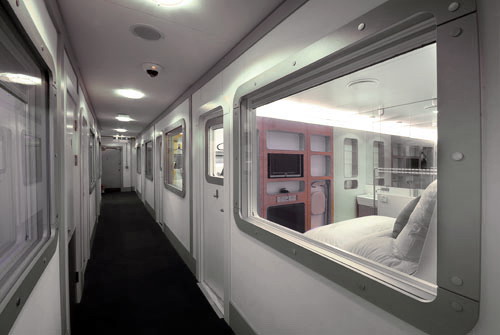
Inside the flying hotel
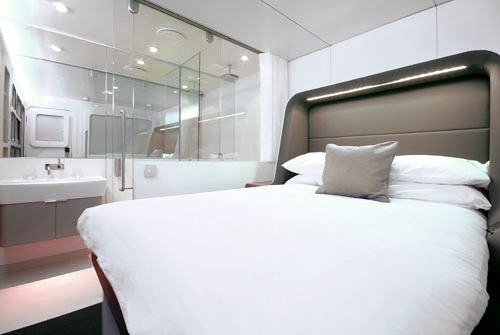
Comfortable bedroom! <3
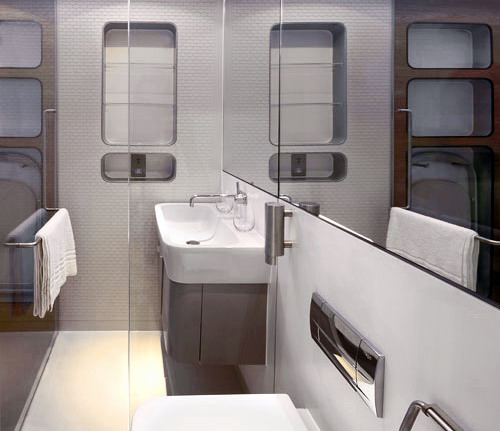
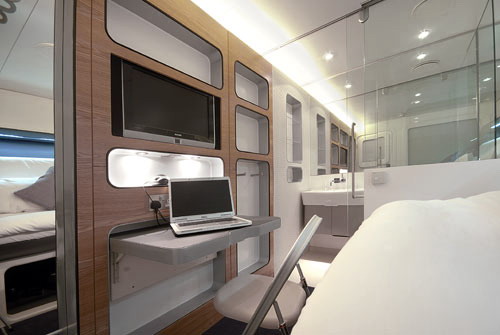
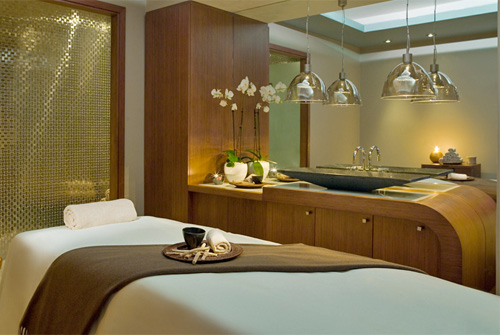
Very cool,right? Omg *,*
*speechless* I'm out. Bye. *speechless*
HAHAHAHAAHA. *speechless*
@ 6:58 PM 0 stares
Nah,kay to the point. Before I start the tutz,this is the image example of picture blending with mextures :

Before

After
See the different,right?
Oh yea,if you're Apple user,you can use Image Blender,Photoforge 2 to blend your image,but both of that apps if paid,hehehe,that's why I dont use Image Blender or Photoforge 2 for blending my image,I choose the simple,free and easy apps; Photoscape. :D
First step,you must open Photoscape and go to Editor.
Second step,drag your image from the file that was the picture are there.
If you already drag...click Object and insert the photo.

Third step,double click to your image,and there will show a box,drag until it shows 64. Make photo fit with the photo before.
Done! Save. Twala its already to share. <3
If there's any question,just email me at nadila061100@rocketmail.com or comment at this post. Cya x
@ 5:53 PM 0 stares

Source: we heart it
Lol look at my title! I dont like Kpop too much buat yea*,* Do you know what? Because all my friends in my class always play AMLIFY or All My Love is For You until I became familiar, I got to download that song,and I start to singing AMLIFY over and over again,what a me!.
Do you know AMLIFY? According to what I know, AMLIFY is the latest song released by one of the Korean girlband who already boom in various countries, SNSD. Uh, right? I don't think so,because it's based on my thoughts only,hehehe. Kay,back to topic. If you want to know and hear AMLIFY,I will give you the video. Here it is!
Video clip of All My Love is For You.
Happy watching! And...I'm in love too with a song named Harus Terpisah by Cakra Khan. Who knows? Hahaha,that's Indonesian song,Harus Terpisah has lyrics that are touching and meaningful, if I've listened to it, I'm immediately upset, hahaha,lol. If you want to hear Cakra Khan voice,you can hear here,lol!
Lyrics of Cakra Khan's song,Harus Terpisah.
Nah,okay,that's what I want to discuss in this post! Soo,goodbye and happy listening! :p
@ 4:15 PM 0 stares
For your information,I already love this skin from "pandangan yang pertama" because it's very neat and the navigation is so cuteee! :3 The maker of this skin is officially creative lol *.* I changed a little bit part of this skin,so it will look more cute,omg I'm in love with this skin!
And..what do you think about this skin? Just comment and insya allah I will reply your comment!
See you!
Friday, December 7, 2012 @ 3:06 AM 0 stares
Good news! Because some people asked me how to make a navigation like me. Uh,oh,what the navigation type? Look at this picture below!

Nah,are you interested with this navigation type? If yes...follow this tutorial!
Step one,you must open your blog. CTRL + F and paste this code below #navbar-iframe { codes.
.navi { position: absolute; top:0px; right: 4px; left: 230px; width:380px; height:25px; border-radius:5px; position:relative; padding:5px; background: url(URL BACKGROUND); color:#ffffff; font-size:11px; font-family: your favorite font; font-size: your font size;}Fuchsia: change with your own width. Make sure that its size is not too big! :D Height: change with your own height. Blue: change with your own radius. Red: Paste your background URL Orange: change with your own font. Green: change with your favourite font. You can use Google Webfonts if you bored with the font that you use it as usual. |

Oh yeah! If you want the navigation is non color for example like white background or whatever you want,you can change the background: url(URL BACKGROUND); code to background: #fff; The bold words can changed by the color codes you want. Twala!
Step three,CTRL + F and search </style> code. Paste this code,below the </style> code. (if you have the header codes,paste it under the HEADER CODES.)
<div class= "navi"><center><a href='URL'>SENTENCE TO NAVIGATION</a> <a href="URL">SENTENCE TO NAVIGATION</a>
<a href='URL' target='_blank'>SENTENCE TO NAVIGATION</a><a href="URL">SENTENCE TO NAVIGATION</a></center></div>
Green: change with the url.
Red: Sentence of the navigation. Ex: affiliates,follow,about me,etc.
If you want to add the navigation options juga type / copy the <a href='URL'>SENTENCE TO NAVIGATION</a>,so also when you want to add more navigation options.
Preview and save!!! Just ask me if you have any problem of this tutorial.
Have fun and happy trying!
Monday, December 3, 2012 @ 9:39 PM 0 stares
Sebenernya aku juga gatau hehehe. Aku kasih liat aja nih contoh fotonya ya :
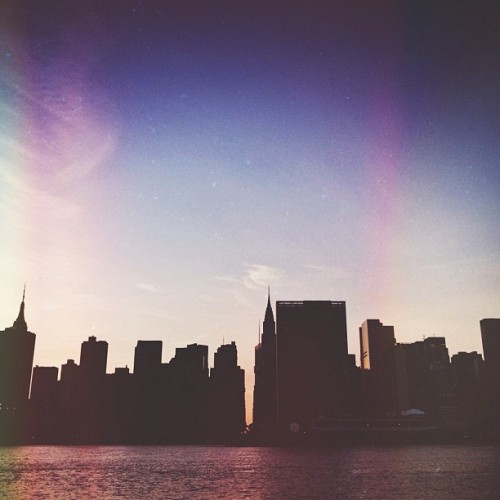
Mextures. Yang tadi foto gaada linear ungu2 gitu *apadeh* jadi ada.
Jadi kaya textures yang digabungin ke foto,tapi kaya gadigabung.
Maksudnya gakeliatan kalau digabung. DUH APA SIH YA
recetbgt sumpah aku ngejelasinnya..
Jadi kaya textures yang digabungin ke foto,tapi kaya gadigabung.
Maksudnya gakeliatan kalau digabung. DUH APA SIH YA
recetbgt sumpah aku ngejelasinnya..
source: mbah Google
Ya pokoknya gitu deh:3 mextures ini biasanya dipake oleh para photographer yg udh profesional*?*. Btw gue barusan download mextures lhoo,free. Kalian mauu? Click disini atau disini. Kenapa gue ngasih cuma 2? karena cuma itu yg free*?* yaudah download aja deh kalau suka,liat2 dulu ya previewnya:3
Aku gatau cara downloadnya gimana..
APA?! GATAU??!!!
Oke ayo gue ajarin.
Ehehe,awal sangar ya. Ceyem bgt gue kalau lagi marah*?* Okeoke gue ajarin dehh.
Pertama,kalian semua buka salah satu link yg td gue kasih. Udah? Oke lanjut. Yang kedua,kalian klik "Add To Cart" tenang2! Ini tetap free kok!

Kalau udah di click,scroll kebawah,lalu ada tulisan "Check Out" kan? Click itu!:))

Terus,isi info2 nya. Email WAJIB diisi. Yang dibawahnya harus diisi juga,tapi gakperlu. Jadi boleh di fake in kok. :) yang penting emailnya yg bener yaaa. Kalau udah diisi semuanya,klik "Continue to next step".
Setelah itu,scroll kebawah dan click lagi "Complete my purchase." Nah kalau udah muncul page baru,jangan di exit yaa! Kamu langsung buka email mu dan check emailmu. Click email dari merek davis store,tinggal download in satu2 deh!
Its very easy guys!! Okee udah dulu yaa. Ada yang mau ditanyain? Comment ajaa.
Bye love ya. :*
Saturday, December 1, 2012 @ 9:53 PM 0 stares
Btw. Disini ujan,disitu ujan gak? *modus dikit bolehlah* k,kalian udah liat kan perubahan blogku ini kan? Ini template buatanku loh:3 setelah ber abad2 menunggu akhirnya selesai juga ini template,simple tapi
Sebenernya,ada bbrp org yg aku jadiin basecodes,kenapa? Soalnya aku kan bukan blogger user yang jago kaya kak lettha,kak ratri dan beberapa blog user senior lainnya. Lho,kok jadi ngmgn blog user senior dan template baru gue? Oke,lanjut ke topic ya.
hari ini,gue mau mbahas tentang ANNOYING BLOG TYPE. Tau kan maksudnya? Itu lho type blog user yg kamu keselin *apadeh* ya garagara dia itu................ya annoying,suka commant comment gajelas trus post nya gitu deh tau ah bingung..wkwkwk. Oke markithastutu > MARi KITa baHAS saTU saTU. *gajelas*
1. Blog User Yang SOMBONG
Dia ini...........sombong bgt! Ada yang punya temen blog yang sombong nya minta ampyun? Contohnya:
"Ih yaampuun,abis dari Bandung,gue beli tikus,marmut,jerapah,gajah,gedung sate,coklat,meises,martabak,sate ayam dll,waah enak bgt lho. Terus yaa,gw juga beli blablabla.."
KAY saya tahu anda membeli semuanya itu tapi gausah di share ke social network juga! Pengen bgt dibilang wow sampe orgnya salto ya? Duh very disgusting! *ew*

2. Blog User Yang Suka NGEHINA Blog Orang

Alhamdulillah gue blm pernah ngerasain ginii,wkwk. Tapi gue kesel jg sihh sama tipe blog gini. Berasa perfect aje lo jadi orang.. *mata merah*
3. Blog User yang Visit CUMA Utk Minta Follow

Gue udah pernah ngalamin kaya gini dan rasanya gedek bgt sumpah. Ngapain si nge visit blog org cuma utk follow? awalnya sih modus,eh akhir2nya minta follow. Suka2 pemilik blog kaliye mau follow lo apa kaga. ewh kamseupay! *efek nntn Putih Abu Abu*
4. Blog User yang Lebay + Alay
- Blogger user yang make background blink blink terus gif. AAAA paling males liat blog kayak gini. So disgusting!!!:s:s
- Blogger user yang make benda benda jatuh dari atas kaya bintang trus love gitu. Duh yg tadinya mau nge stalk blog itu,jadi males soalnya udah berat trus loadingnya lama bgt. This is make me urgh,badmood..
- Blogger user yang suka masang widget gajelas kaya kalender,jam,apalah itu. Bikin berat blog lu aja deh
- Blogger yg hobi copas isi blog lain tanpa IZIN! Gue pernah nih ngalamin begini. Kesel bgt rasanya. Kalau mau copas kasih credit atau bilang gitu kek. Ini malah engga sama sekali. Huft :s
- Blogger yang punya ucapan POP UP. Pas buka blog nya,tibatiba ada tulisan "Hai! Selamat datang di blog Indah Sangat Indah! Tulis namamu yaaa : " dan kalau udah mau nge exit blognya,ada tulisan "Terima kasih telat mengunjungi blog Indah Sangat Indah! Datang lagi yaaa" what a people!
- Blogger yang suka komen "pertamaxxx" "keduaxxx" "ketigaxxx" duh INI BUKAN KASKUS! This is blog!
Udah deh ye,drpd marah2 mulu mending kita nonton Idola Cilik 3,seru lho :p wkwk yg ngerasa kesindir ubah yaa keburu banyak hatersnya *ceramah*
Sipsip,byeee!!
Cya x
@ 8:28 PM 0 stares
Hey guys! My name is Novrita Nadila Humaira. People called me Ira.
Eh males deng pake bahasa inggris,udah deh lanjut ya. Aku sekolah di sebuah sekolah negeri *ea* di Pamulang,pdhl rumahku di BSD,jauh ya? Aku dulu SDnya di sebuah sekolah swasta islam gitu deh. Ultahku tanggal 6 November 2000. YANG MAU ngasih kado boleh kok *plak*
Aku nge blog dari tahun 2011 dan aku punya BUANYAK BLOG.
Oke ini lebay. Daripada keterusan nulis,mending udahan aja ya. Cukup kan? Baybay readers tersayang mwaaaach *tebar*

Friday, November 30, 2012 @ 8:28 PM 0 stares
Finally I come back from hiatus<3
daan doain aja yaa semoga ttp produktif utk ngepost ke blog walaupun gaada yg baca!
APA KABAR SEMUANYA? BTW BTW NIH GARAGARA UDH LAMABGT GA ONLINE BLOG,udah lupa deh gimana kode2nya.. poor me.
Kayaknya,skrg blog udh mulai sepi ya? Huu:"
Mau curhat nihh.
Sekarang lagi in love bgt sama yg namanya ONLINE SHOP! Nih brg yg aku beli di online shop dan terpengaruh grgr online shop:

Oreo bits,loacker,chocolate milk diamond,hersheys milk chocolate!
Damn yummy<3:3
Damn yummy<3:3
ini punyaku. Beli nya di toko buah di Slipi. Gede sih toko buahnya;3

Ini kitkat greentea,kitkat cookies and cream sama pocky vanilla!
Very yummy<3,ini beli di online shop. Ig nya @japancorner ;D
Very yummy<3,ini beli di online shop. Ig nya @japancorner ;D
Yang satu lagi,lg dalam on process nih. Aku rencananya mau beli Kitkat Mint sama Nutella and Go di @japancorner juga. Udah percaya sihya :D
AAA gasabar! Mahal2 tapi rasanya enak,gamasalah kann? Pokoknya I'm in love with Online Shop<3 Ada yg addict juga sm online shop? Sama dongg. Hehe udah deh segitu dulu.
MAAF KALAU GAJE,ini iranya lagi gaje soalnya baruuu aja mandi
trus lg stress hari senin sampe rabu ujian direktorat dan minggu depannya lg FULL UAS. OMGGGG T.T
Ok dah dulu deh.
Bye:) cya x
Friday, August 10, 2012 @ 4:58 PM 0 stares
Kenapa begitu,ra?
Kenapa? Jawabannya..ini:
1. Gue pengen serius belajar nih. (EAA walaupun masih addicted ke social network yg lain cekaceka)
2. Gue udah sering gaada niat buat 'obrak abrik' blog alias ngehias blog. entah kenapa,bro! padahal dulu..kalau ada skin bagus langsung semangat 4 5 untuk melahapnya. HAP! Gadeng.
3. Blog gue sepi..masa follower cuma 41(?)
Okbye itu aja yang mau gue omongin.
Bye,now i'm officially HIATUS!
NB: DON'T UNFOLLOW ME.
Friday, June 15, 2012 @ 7:16 AM 0 stares
Stress bgt sumpah,besok udah mau PENGUMUMAN UN SD!
 sebenernya ga stress jg sih ya-_- tapi gmn gitu,rasanya deg-degan abis bro. Gimana kalau gue gak lulus? Gimana kalo nem gue rendah? Ah,itu hanya Allah dan si orang yang meriksa ljkun gue yang tau,positive thinking aja
  Btw,apakah kalian tahu,UN itu apa? Idih sinting bgt ya gue-_- *ya taulah!* yap,UN itu Ujian Nasional. Pengalaman gue setelah UN,belum gue post disini yah? Hehe,iyalah orang gaboleh main sama sekali *-_-*. Sebenernya,pengumuman un sd bisa di check di web (kata tmn) tapi gue mah OGAH bin OGAH. Karena apa? Karena............................kasih tau gak ya? Bercanda kay. Karena,gue jd gabisa nge 'wow' nge 'shock' pas pengumuman un nya dong,kan gak asik kalau misalnya yg lain teriak2,nangis,sujud syukur,gue diem mematung dengan bilang "Yah gue mah udh tau gue lulus *brick face*" dalam hati. Kan ga enak tuh? Hehehe. Gajelas.
Btw,gue buat quotes account lhoo. Yang ngusulin sih kak Syaffa,usernamenya;
@mermaidisland
Seru banget lho. Disana kita nyampah gitu deh. Masa ya,masa. Kita buat twitter tanggal 14 Juni (kemaren) tweetsnya udh 300! Huahahaha *evil laugh* dan..gue juga menemukan skins yang super duper creative. [link]
Naah,itu aja deh yg mau gue bahas-_- ganyambung yah. Topik pertama emg nyambung sama judulnya,tapi topik ke 2 & 3? GA SAMA SEKALI.
Kbye & cya x
@ 3:22 AM 0 stares
Actually,before I already said I'll not made tutorial again from this June. But...many people asked me for this tuthorialz,so,today,I will sharing this to ya all :-D
Nah,that's it. Here we go.
First,choose the link that you wanna make pop up. And then,copy the code below,and paste it on the place you want ;
<!-- Codes by Quackit.com -->
<script type="text/javascript">
// Popup window code
function newPopup(url) {
popupWindow = window.open(
url,'popUpWindow','height=700,width=800,left=10,top=10,resizable=yes,scrollbars=yes,
toolbar=yes,menubar=no,location=no,directories=no,status=yes')
}
</script>
<a href="JavaScript:newPopup('YOUR POP UP URL');">Open a popup window</a>
Red,change it with your desired height. Purple,change it with your desired width.Bold,change it with your pop up url. Fuchsia,change it with your message.
You're done.
Thanks Quackit for the codes :D
Have a problem? Message me. I hate copycaters,damn you copycaters!
[Updated]
Labels: tutorial
Thursday, June 14, 2012 @ 12:17 AM 0 stares
Gue mau ngasih "SWATAGGIE" lagi nih. Sebenernya,janji gue itu swataggie bakal diadain 2 minggu sekali *eh bener gaksih,gue aja lupa-_-* oke skip be,langsung ajah,ini pertanyaannya,cekibrots!

1. Sebutin 5 Hal Yang Paling Dibenci
2. Penjelasan tentang copycaters
3. 5 Skins Yang Disukai
4. 5 Makanan Khas Dari Daerah Lo
5. Pernah gak berantem sama temen gara2 hal sepele? Kenapa? Gimana cara ngatasinnya?
Oke,pertanyaan itu sebenernya menjurus ke arah kepo,tapi gak papalah. Kerjakan saja,kawan! Hidup ini indah
 *eh* Dan,gue akan nge tag ini ke....................JENG JENG JENG!!
-Kak Lettha
-Ami
-Kak Lala
-Afifah
-Rasya
Thats it all. Kerjain ya. Hehe
Cya!x
Wednesday, June 13, 2012 @ 2:06 AM 0 stares
Gue abis bersusah payah buat header nih. Namanya "Abstract Header" kaya semacam abstract gitu letaknyaa. Gue memutuskan untuk NOT IN USE. Although,you already tell the permission :) karena ini susah bgt buatnya. Udh gitu,jarang2 kan yg ngasih freebies abstract header gini? Picturesnya jg susah didapet. Here it is,comment ya di comment box,bagus atau jelek. Kalau jelek,gue bakal perbaiki lg. Kalau bagus,thank you!! :)
P/s: gue lg OPEN request buat header. Yang mau bisa contact sm gue di Facebook gue (kita chat brg) nama FB gue: Novrita Nadila Humaira. Kalo lo nge request selain via Facebook,gue gabakal ngebuatin headernya. Gambar kalian yang pilih sendiri,kasih linknya. FREE lho. Sampe tanggal 25 Juni,hurry up!
Btw,this is my abstract header creation :

Masih jelek ya? Maklum lah baru newbie huuuhu.
Cya!x
Labels: abstract, asdfgajelas, header
Tuesday, June 12, 2012 @ 10:47 PM 0 stares
Hua judulnya kok ngenes gitu yah-_- emangnya laptop / komputer ada jenis kelaminnya? Ngaco,lo ra-_- Jangan salah! Ternyata ada lho. Betewe,gue ketemu artikel yang super keren bikin gue terkejut,dari blognya Ratri,dan sumber aslinya itu dari Terselubung. Gue udh nyoba dan hasilnya...gue gatau jenis kelamin laptop gue itu apa-_- gue bingung itu suara cewe atau cowo atau malah mungkin banci. Mau tau caranya? Cekibrots!
1. Pergi ke notepad yang ada di komputer / laptop lo.
2. Done? Okay lanjut. Copy kode ini: CreateObject("SAPI.SpVoice").Speak"I Love You"
Paste di kolom Notepad yang kosong itu. Begini nih:

3. Kalau udh klik File > Save as > Save file dengan nama: xyz.vbs

4. Klik save. Abis itu,lo ke Documents / My Documents > Cari file yang tadi > Klik. Kalo yang keluar suara cewek,berarti jk (jenis kelamin) laptop lo cewek. Begitu juga sebaliknya jika yang keluar cowok.
All done. Kasih tau ya,di comment,jenis kelamin laptop lo apa?x)
Have fun & cya :)
@ 9:43 PM 1 stares
Gue memilih buat post kyk gini,karena skrg lg hot2nya di twitter-_-

Mungkin,bagi kalian gue itu terlalu TELAT untuk membahas yg beginian. Gue emg baru ada idenya skrg,dr kemaren2 gue suka bgt nge stalk twitternya Chiters (sebutan untuk hatersnya Cherrybelle) ada @RIPChibi @WeHateChibi dan lain2.
Nah,skrg gue mau ngebahas nih ttg mereka.
P/s: NO JUDGE! This is my opinion :D
Well,gue suka sama SNSD. Ga terlalu ngefans berat sih,cuma suka 2 lagunya aja,Kissing You & The Boys. Sedangkan Cherrybelle? Gue cuma suka lagunya yang Best Friend Forever aja,enak gitu deh. Menurut gue,mereka itu keren,cantik2,dan energik.
But...
Banyak yang bilang kalau Cherrybelle itu plagiat dari SNSD lah,7icons dll,tapi apakah itu benar?
Menurut gue sih ya,kalau Plagiat sih emang iya. Tapi,Cherrybelle juga punya ketertarikan sendiri kan? Ya trus bagi gue,emang yang boleh gaya gitu cuma SNSD doang? I DONT THINK SO yea!
Ini dia list 6 kemiripan Chibi dan SNSD (yang gue tau) dan tanggapan gue:
1. Lagu Best Friend Forever-Cherrybelle plagiat lagu SNSD-Kissing You.
2. Gaya mereka sok imut,dan banyak foto Chibi yang ngikutin SNSD.
3. Anisa niruin pose Yuri.
4. Sebutan buat Cherrybelle ada 2,yaitu Cherrybelle dan Chibi sedangkan SNSD juga punya 2 sebutan,SNSD dan Girls' Generation.
5. Style rambut Gigi mirip sama Sooyoung.
6. Koreografi plagiat
Tanggapan:
1. Emang iya sih mirip BGT. Tapi.....peraturan internasional mengatakan "sebuah lagu bisa dibilang plagiat kalau kemiripan melebihi 8 bar" terus kenapa? Lagu Cherrybelle yang BFF cuma 4 bar loh :)
2. Mereka imut kok (menurut gue) dan bukan sok imut. Dan,emgnya yang boleh foto kaya gitu cuma SNSD doang? Lo boleh kok ngatain Cherrybelle plagiat kalo lo udh ngecek semua foto girlband / idol grup yang mirip sama SNSD cuma Chibi. Paw. :D
3. Di dunia ini ga cuma Anisa doang yang gaya foto nya kaya gitu. Jadi,kemungkinan kecil kalo Anisa yang niru pose nya Yuri.
4. Wtf -,-
5. Yang boleh pake style rambut gitu Sooyoung doang? Ga cuma Gigi kok yang make style rambut gitu :)
6. Sebutin dong koreografi yang di plagiatin :D
(Source list: here)
Sebenernya sih,KATA GUE yaa,kalo misalnya lo ngejek2 Cherrybelle plagiat lah,sok imut,norak di twitter,itu bakal malu2in Indonesia sendiri lho. Apalagi kalo misalnya diliat orang luar,itu sama aja lo malu2in negara sendiri. Mendingan pindah negara aja kalo lebih milih belain musik korea daripada musik Indonesia. Ga maksa juga sih,tapi sih SEBAIKNYA begitu. :)
Hmm. Itu aja sih opini gue. Gue gabermaksud belain SNSD / Cherrybelle disini. Gue cuma memberi opini aja.
REMEMBER! NO JUDGE! Ini opini gue kay :D
Cya.
Labels: opinion
Monday, June 11, 2012 @ 11:46 PM 0 stares
P/s: Password di preview itu adalah: kidrauhl
Preview:
Enter your password
Thats it. This is the tuthorialz:
Thats it. This is the tuthorialz:
Sign in blog > dashboard > template > CTRL + F <head>
Copy & paste code dibawah ini,letakan dibawah code <head> :
Udah? Kalau udah,click disini. Disitu ada tulisan Key,Plain Text,Cipher Text,HTML Code,HTML Test kan? Di form Key tulis password yang kamu mau. Sedangkan di Plain Text,tulis apa saja yang akan keluar saat password yg diketik benar. Click Encrypt dibawahnya.
Di kotak HTML Code,copy dan paste di post kamu.
Code yang satu ini,aku emang credit yaah untuk kak Susan,yang diatas ENGGAK. Real made by me,jangan salah sangka hehe :)
Mungkin dalam template XML ini tidak akan bekerja, menyebabkan javascript tidak didukung oleh template XML. Jika masalah ini muncul, ganti javascript di atas dengan ini sebagai gantinya:
Paste di antara <head> dan </head>
All done!! :))
Mau nge copy tutorial ini? Copy kode dibawah dan paste di bawah post an kamu itu :
Labels: tutorial
Sunday, June 10, 2012 @ 11:27 PM 0 stares

Sebenernya itu sama aja dengan update box yang pernah aku tulis tutorialnya. Belum liat? Click disini. Tapi cuma beda aja. Ada gambarnya diatas.
Oke,udh ngerti kan?
Template 2006 & Designer
Dashboard > design > page elements > add a gadget > HTML / Javascript
Copy kode dibawah ini dan paste di kolom HTML / Javascript.
Lets Study:
-Tulisan "URL GAMBAR" diganti dengan URL GAMBAR punyamu.
-Tulisan 'novritanadila' diganti sama usernamemu.
Click save.
Blogskins / Classic Template
Dashboard > Template > CTRL + F tempat ditaruhnya gadget ini.
Copy and paste:
Lets Study:
-Tulisan "URL GAMBAR" diganti dengan URL GAMBAR milikmu.
-Tulisan 'novritanadila' diganti dengan username twittermu.
All done.
Copy this tuto? Langsung aja,copy kode dibawah ini dan paste di bawah postingan mu itu.
Easy right?
Cya.